
How to organize travel photos by trip, automatically
Organizing travel photos by hand means scrolling through thousands of shots and dragging them into albums — most people give up halfway. Automatic organization uses the timestamps and GPS data already attached to your photos, so the sorting is done before you start.
Bloggo scans your camera roll on your iPhone, detects when you were traveling, and groups every trip's photos by day and place. No albums, no tagging, no uploads.

How to do it with Bloggo
- 1
Let Bloggo scan your camera roll
Open Bloggo and grant photo access. The scan runs on-device and finds trips using time and location patterns.
- 2
Browse your trips by year
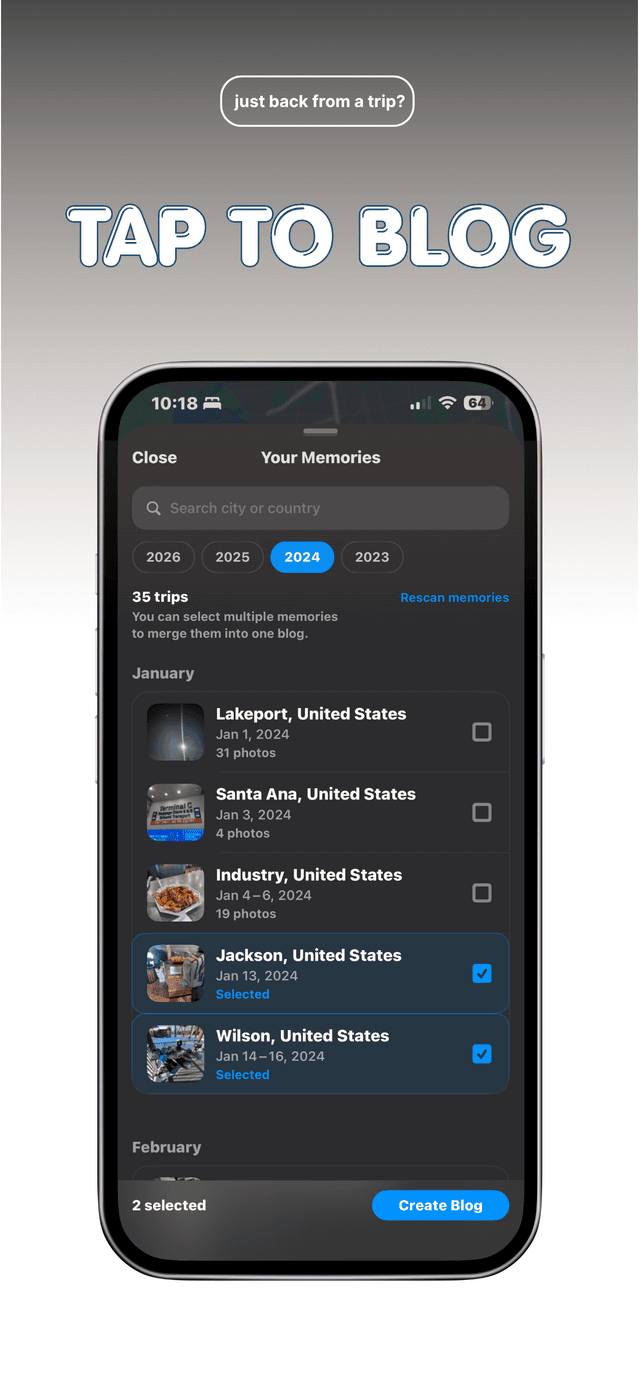
The 'Your Memories' screen lists every detected trip with its dates, city, and photo count — three trips or 35, all found for you.
- 3
Open a trip to see it grouped by place
Inside each trip, photos are clustered by the places you visited, in the order you visited them, with the distances in between.
- 4
Rescan whenever you like
New photos, new trips. Tap 'Rescan memories' after your next trip and it appears in the list.
Common questions
What if a trip is split in two?
Select both memories and merge them into one blog — a split trip is a two-tap fix.
Does this work on old trips?
Yes. Bloggo scans your whole camera roll, so trips from years ago show up alongside last weekend.
Is my location data shared?
No. Bloggo reads photo metadata on your device to group trips. Nothing is uploaded.
Try it on your own photos
Bloggo is free to download. Your first blog takes seconds.